

Last week, while I was away, my AI leadgen workflow scraped 128 Singapore websites that looked like WooCommerce stores. After running them through a series of n8n workflows, 9 of them ended up as cold outreach drafts in my Gmail inbox. The other 119 were filtered out, mostly without me looking at them.
That’s the part I want to talk about. Not the 9 emails I sent, but the 119 I didn’t.
I sell a WooCommerce plugin called SGPayNowQR that lets Singapore shops accept PayNow directly to their bank account, with no commissions and no payment gateway fees. The total addressable market is small; maybe 3,000 stores? But of those, many are paying transaction fees when they collect payments, which is the group worth approaching.
But I didn’t want to mass blast a generic prospecting email to 3000 store owners. That’s a fast way to get my domain blocked. And I also didn’t want to manually browse to each store, look at what payments they accept at their checkout, and writing a tailored email to each one. It would be too much work for a solo.
So I built a pipeline that does the site research for me, drafts a personalised email based on what it finds, and then shows me the drafts for approval before anything goes out.
How the lead funnel narrows from 128 to 9
The pipeline runs as a series of n8n workflows. Each one handles one stage below:
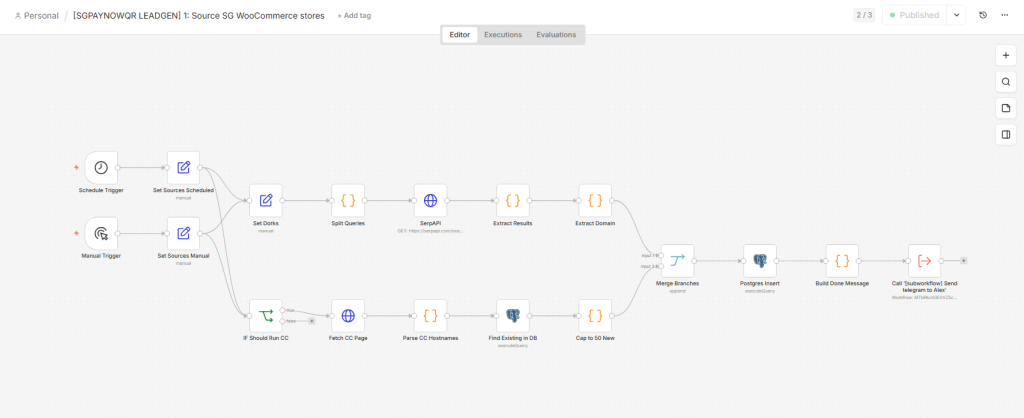
Sourcing. A scheduled workflow searches Google and Common Crawl for Singapore websites that look like WooCommerce stores. Last week, it surfaced 128 new domains.
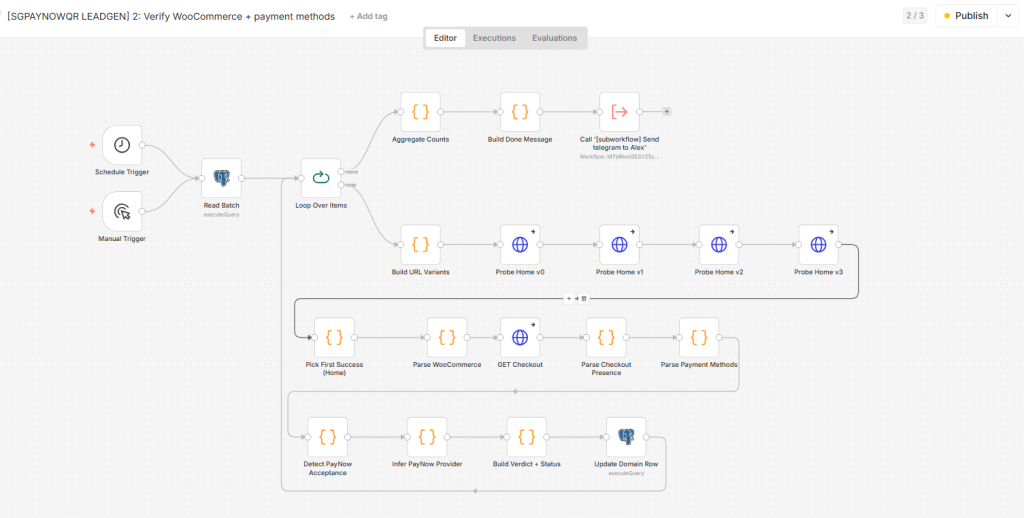
Verifying. A second workflow visits each site’s homepage and checkout page autonomously, and checks for actual WooCommerce signals. Out of 66 processed so far, only 26 had a working WooCommerce checkout. The other 40 turned out to be empty catalogue sites, broken installs, or not WooCommerce at all. So, about 40% pass rate.
Tagging. Of the 26 verified stores, the workflow groups each one based on what’s at their checkout: cards only, Stripe-powered, HitPay-powered, already accepting PayNow directly, or unknown (perhaps it got bot-blocked or rendered in JavaScript). This tag determines what message I’ll eventually send.
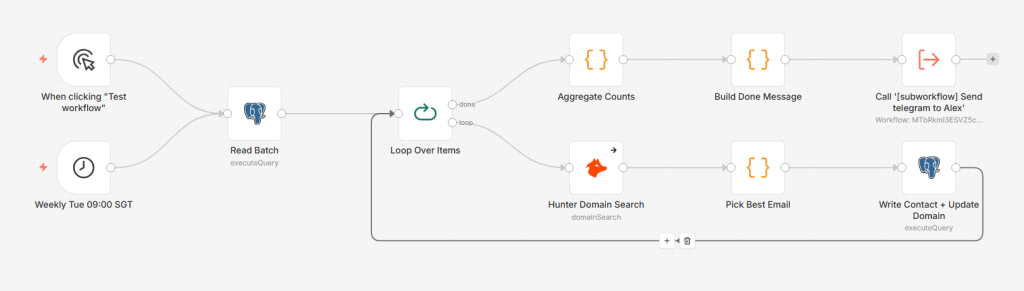
Enriching. Verified stores then go through Hunter.io to find at least one contact email. 17 came back with something usable. 9 had no findable email and got dropped. 65% pass rate from verified to enriched.
Reviewing. I look at each of those 17 in a small dashboard I built. 8 got disqualified on sight, mostly because they were catalogue-only sites that don’t actually transact online, or subdomains of large organisations. 9 made it through.
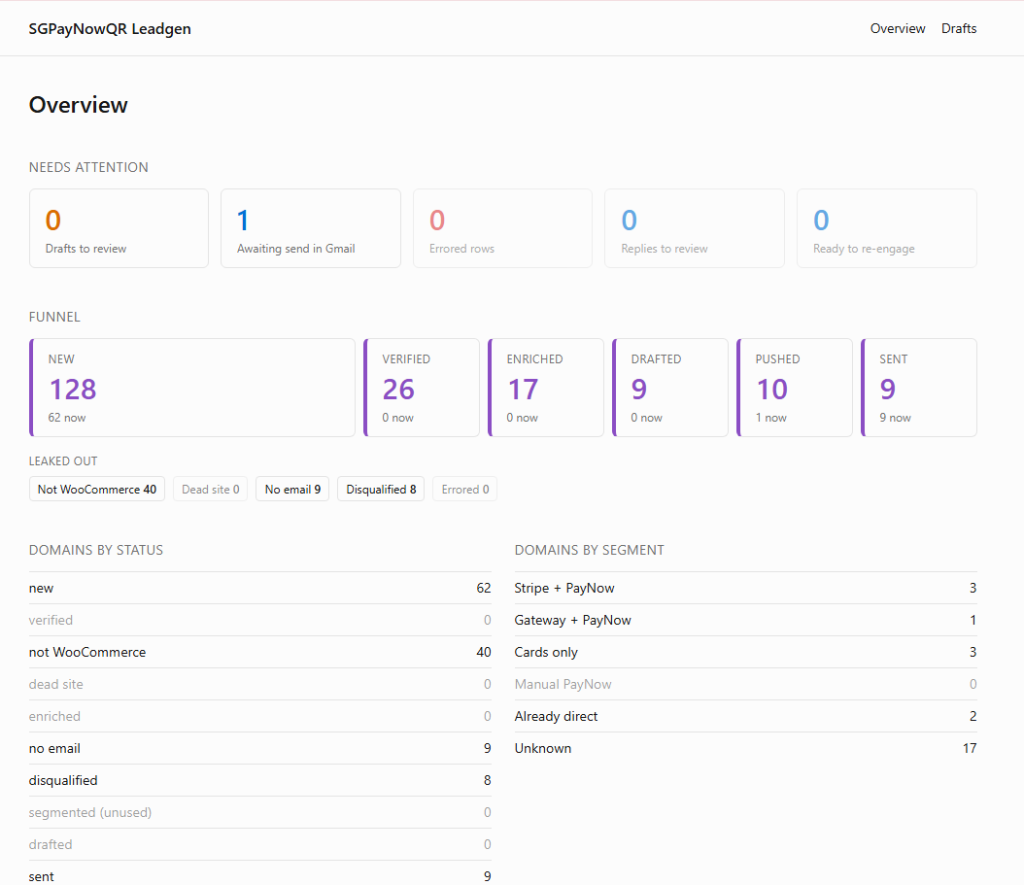
Drafting. Those 9 get sent to Claude, which writes a personalised email each. 9 drafts land in my Gmail inbox.
Sending. I open each one in Gmail, give it a final read, click Send.
So from 128 raw domains to 9 emails, that’s a 7% pass rate end-to-end. For every 14 sites my workflow finds, 1 actually deserves to hear from me.
The valuable bit isn’t the 9 drafts. It’s that I never had to manually look at the 119 that didn’t make it. The pipeline drops them based on actual signals (no checkout, no email, wrong type of site), not on a vague guess.
Customised emails depending on the target
Even though I sell one plugin, the value proposition might be different depending on what the store is currently doing. For example, if your store only accepts Visa and Master with no PayNow at checkout, my email draft is written a certain way.
Or if you’re a Stripe-based store, the email is different. “I notice you’re using Stripe at checkout. If you’re using Stripe to collect PayNow, you’re paying their 1.3% commission on every PayNow transaction.” Now it’s about the fee, not the feature.
We’ve all seen AI cold outreach emails that get our details wrong, or sounds completely generic. The temptation when you have an LLM in the loop is to ask it to sound more confident, more persuasive, more sales-y. But at my scale, I wanted it to create highly customised drafts that needed my approval first.
The human-in-the-loop part
Once a draft is written, it lands in the dashboard. I can open it, edit as needed, click Approve or Reject. Rejected ones get a reason logged (“catalogue site, not a real shop”, “uni subdomain not a SME”) so I can spot patterns over time and improve the earlier stages.
Approved drafts get pushed into my actual Gmail inbox via the Gmail API. I open Gmail and hit Send myself.
There’s a version of this pipeline where I let the AI send automatically. I considered it. I decided against it for a specific reason: the moment a bad email goes out, I don’t want to be able to blame the automation. If I send a tone-deaf email to an unsuitable prospect, not on AI. Putting my own thumb on the Send button keeps that responsibility clearly mine.
What this workflow can’t do
It can’t tell whether the store is actually doing meaningful sales volume. A WooCommerce shop with 3 products and one sale a month is treated the same as a store doing six figures a month. Hunter.io’s company data is too thin in Singapore to filter on this.
It also can’t write an email that is customised to the store’s founder. That’s because I don’t have any enrichment stage that tries to stalk the founder’s details from LinkedIn. So the AI’s drafts are competent, accurate, and on-voice. but it’s not going to write a clever one-liner about a specific founder’s backstory, because it doesn’t have that data.
Why this approach works
AI has made it dramatically easier to build pipelines like this, at a level of effort I can actually sustain as a solo without being completely hands off. Each email goes out because the system has done specific homework on the prospect. And it creates a personal outreach that feels like it came from me.
This is also the same shape as my approach to content automation and case-study generation. Let AI handle the high-volume mechanical work, but keep a human in the loop on anything that touches the customer.
What does your outbound look like at the moment?
Related:


 Every week, this AI turns 2500 lines of marketing data into a single action item for me


Leave a Reply